Quotation Comparison Template: Compare Supplier Quotes Line by Line
A free Excel sheet that sets four suppliers’ unit prices side by side, separates missing lines and gives a comparable total — and the four situations that make grand totals mislead.
How do you build a quotation comparison sheet?
A quotation comparison sheet sets the unit prices that several suppliers quoted for the same item list side by side, line by line; it shows the lowest price on each line and compares totals only over the lines every supplier quoted. Before totals are compared, three things are made equal: the unit (box or piece), the tax basis (all excluding VAT) and the scope (missing lines). Terms other than price — lead time, payment terms, quotation validity, freight and equivalents — are kept in separate rows of the same sheet.
Free quotation comparison template (Excel)
A ready sheet for four suppliers and forty lines: enter the unit prices, and the amounts, the lowest price on each line, the number of missing lines and the comparable total are calculated automatically.
No sign-up. Supplier names and prices in the example lines are made up; delete them and enter your own quotes. The template does not choose a supplier.
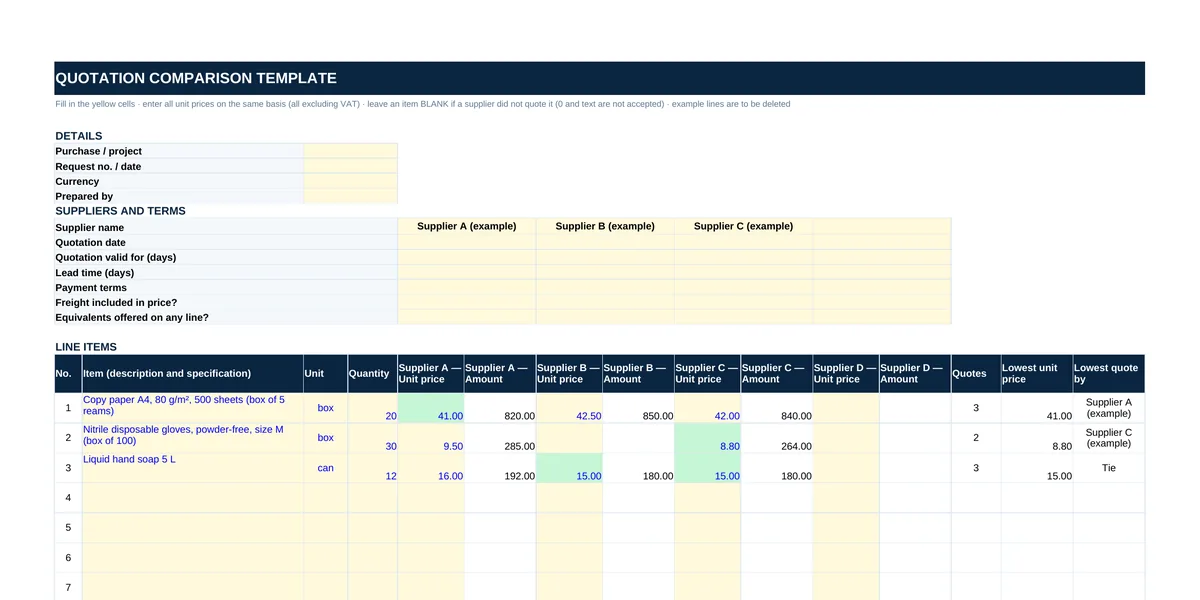 — open full-size image
Why the grand total misleads
Putting two grand totals side by side is the quickest comparison, but the result is wrong if any of these four situations applies:
| Situation | What happens | How the sheet handles it |
|---|---|---|
| Missing lines | A supplier that did not quote a line looks cheaper on the total. | The cell is left blank; the summary shows the number of missing lines and, separately, the total of the lines every supplier quoted. |
| Different units | One quotes per box, another per piece; the unit prices cannot be compared. | Each line carries one unit; a price quoted in another unit is converted to it first. |
| Mixed tax basis | If one quote includes VAT and another does not, the gap is the VAT. | All unit prices are entered excluding VAT. |
| Freight and equivalents | A quote with freight charged separately, or with an equivalent product, may not price the same job. | Marked per supplier in the terms rows. |
In the template’s example, Supplier B did not quote the gloves. On the all-lines total B looks cheapest (A 1,297.00, B 1,030.00, C 1,284.00); on the two lines all three suppliers quoted, B is the most expensive (A 1,012.00, B 1,030.00, C 1,020.00).
Which fields the sheet needs
| Section | Fields |
|---|---|
| Details | Purchase or project, request number and date, currency, prepared by |
| Suppliers and terms | Supplier name, quotation date, validity, lead time, payment terms, whether freight is included, whether equivalents were offered |
| Line items | Line number, item description and specification, unit, quantity |
| Supplier columns | Unit price and amount (quantity × unit price) for each supplier |
| Line result | Number of suppliers quoting, lowest unit price, lowest from (“Tie” on equal prices) |
| Summary | Lines quoted and missing, total of quoted lines, total of lines every supplier quoted, number of lines where lowest |
How to use the template
- Fill in the details and the supplier names at the top; a column without a name is ignored, and a price typed into it turns red.
- List the items in the order you sent them to suppliers, in one unit each.
- Enter each supplier’s unit price in its own column, excluding VAT; leave a line blank if it was not quoted. The price cell does not accept 0 or text.
- The lowest unit price on each line turns green; on equal prices the last column shows “Tie”.
- Read the totals from the comparable total row of the summary and weigh them against the terms rows.
Is the lowest price the only criterion?
No. A longer lead time, prepayment, a short validity period, freight invoiced separately or an equivalent offered instead of the specified product can cancel out a lower unit price. That is why the template does not pick anyone: the terms sit in the same sheet above the prices, and the buyer decides.
Ask for quotes in the same format
Comparison is much quicker when quotes arrive in the same format. Send every supplier the same request for quotation with line numbers, units and quantities already filled in, and the answers come back in the same order.
Frequently Asked Questions
Should prices in a quotation comparison include VAT?
They should all be on the same basis; the template asks for unit prices excluding VAT. If a supplier quoted including VAT, take the VAT out before entering the price. Rates can differ from line to line, so do it line by line.
What if a supplier did not quote some lines?
Leave those cells blank. The summary shows that supplier’s missing lines, and totals are read from the comparable total row, which covers only the lines every supplier quoted.
What does the sheet show when two suppliers quote the same price?
The last column on that line shows “Tie” and both prices turn green. The template does not choose; check lead time, payment terms and validity.
How many suppliers and lines does it hold?
Four suppliers and forty lines. A supplier column without a name is left out of the calculations.
Related guides
Purchasing Procedure Template
Steps from request to payment, approval limits and records — free Word.
Read moreRequest for Quotation (RFQ) Template
Ask every supplier for prices in the same format — free Excel.
Read moreSupplier Evaluation Form Template
Score suppliers on more than price — free Word and Excel.
Read morePurchase Order Form Template
Place the order with the supplier you chose.
Read moreSupplier Consolidation Transaction Cost Calculator
What moving tail spend to fewer suppliers saves.
Read moreSend your list — your quote is ready within 1 business day.
A list, a photo or an Excel file — whatever is easiest. On standard items we aim to quote the same business day. Custom production, imports or 50+ line lists can take longer; when they do, we tell you the timeline in writing on the day we receive the request.