PPE Register Template: Free PPE Issue Record in Excel
A free Excel register for personal protective equipment issued to employees: item, standard, size, issue date, signature, next check and return — with a column that flags missing entries.
What is a PPE register?
A PPE register is the record of personal protective equipment issued to each employee: which item, its standard or class, size and quantity, the issue date, the reason for issue and the employee’s signature. Adding the next check or replacement date and the return or disposal date turns it into a working record for inspections and reordering. The free Excel template below keeps one line per item and flags missing entries.
Free PPE register template (Excel)
One line per item issued, with a Check column that flags missing names, items, quantities and dates.
General template; check what records your local rules require. Not legal advice.
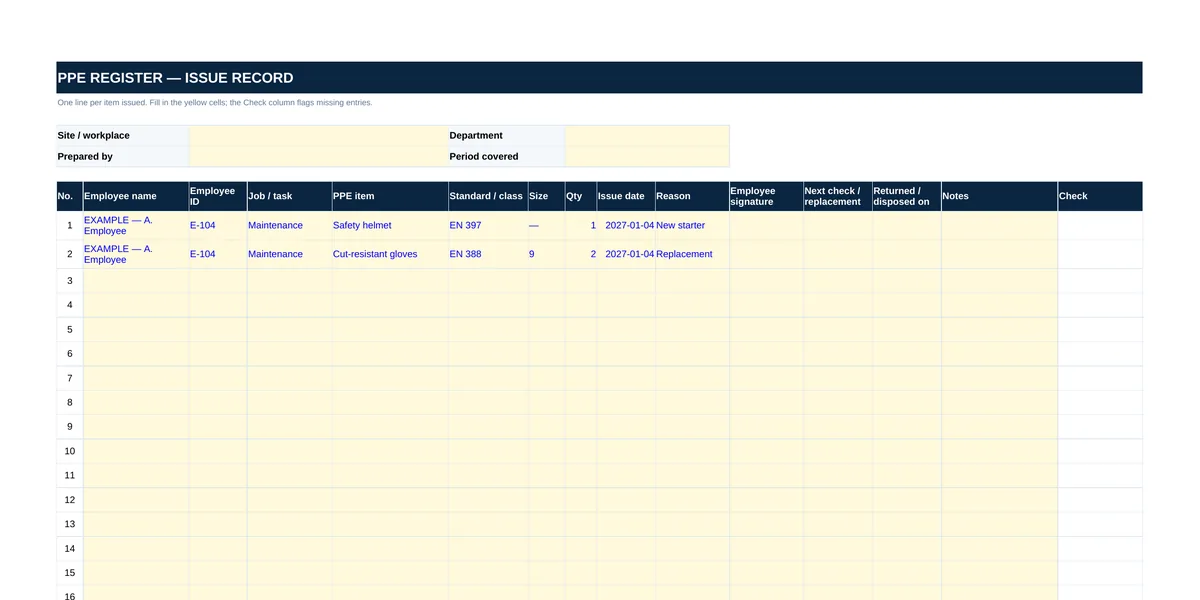 — open full-size image
What to record
| Column | Why it matters |
|---|---|
| Employee name, ID, job or task | Shows who received the item and for which work |
| PPE item, standard or class, size | Identifies exactly what was issued — copy the standard or class marked on the product, for example EN 388 on gloves |
| Quantity and issue date | The issue date is the starting point for checks and replacement |
| Reason | New starter, replacement, damaged, lost or additional — shows why stock is used |
| Employee signature | Confirms the employee received the item |
| Next check or replacement | Date you set from the manufacturer’s instructions and your risk assessment |
| Returned or disposed on | Closes the line when the item comes back or is thrown away |
Setting the next check or replacement date
The register does not set intervals. Use the manufacturer’s instructions for each item and your own risk assessment, and replace damaged equipment as soon as the damage is found, whatever the date. For what drives replacement for each type of PPE, see PPE replacement intervals; for reading the standard and class codes on labels, see the PPE EN standards guide.
From register to reorder list
Counting issues by item and size shows which items and sizes are used fastest — the basis of a reorder list. To source PPE, send the list with standards and size breakdown through the quote request page; see also safety equipment and PPE.
Frequently Asked Questions
What should a PPE register include?
Employee and job, PPE item, standard or class, size, quantity, issue date, reason, the employee’s signature, the next check or replacement date and the return or disposal date.
Who sets the next replacement date in the register?
You do: there is no single interval for all PPE. Follow the manufacturer’s instructions and your risk assessment, and replace damaged items as soon as damage is found.
Is a PPE register the same as a PPE issue record?
They are used for the same purpose: recording which PPE was issued to whom and when. Some organisations keep a separate signed form per issue; this register keeps the signature on each line.
Send your list — your quote is ready within 1 business day.
A list, a photo or an Excel file — whatever is easiest. On standard items we aim to quote the same business day. Custom production, imports or 50+ line lists can take longer; when they do, we tell you the timeline in writing on the day we receive the request.